
How to Prevent Ecommerce Fraud in 2026: A Merchant’s Guide to Best Practices

Best practices for merchants to prevent ecommerce fraud in 2026 include payment method verification at the payment gateway, AI risk scoring, chargeback prevention, cross-channel monitoring, and a written response plan. Ecommerce fraud prevention combines payment, account, behavioral, and monitoring controls to catch fraudulent activity without unnecessarily blocking legitimate customers. None of these controls catches everything on its own, which is why layered fraud prevention works better than any single alert—each one covers another's blind spots.
Two of these controls—payment verification and risk scoring—happen at checkout, where they can inadvertently decline a valid customer. For example, an order set up to ship to a different address than the billing address may be paused or declined because it might look like fraud, even though that’s a common way to send a gift. Some customers will try again, but some won’t. And you won't be able to tell the difference between a fraudster you stopped and a customer you lost.
How can you reduce ecommerce fraud without unnecessarily turning away legitimate customers? Use several controls together, so one flagged action doesn't decline an order on its own. This guide covers the different types of fraud controls, what each might miss, and what to do about it.
What types of ecommerce fraud do merchants face?
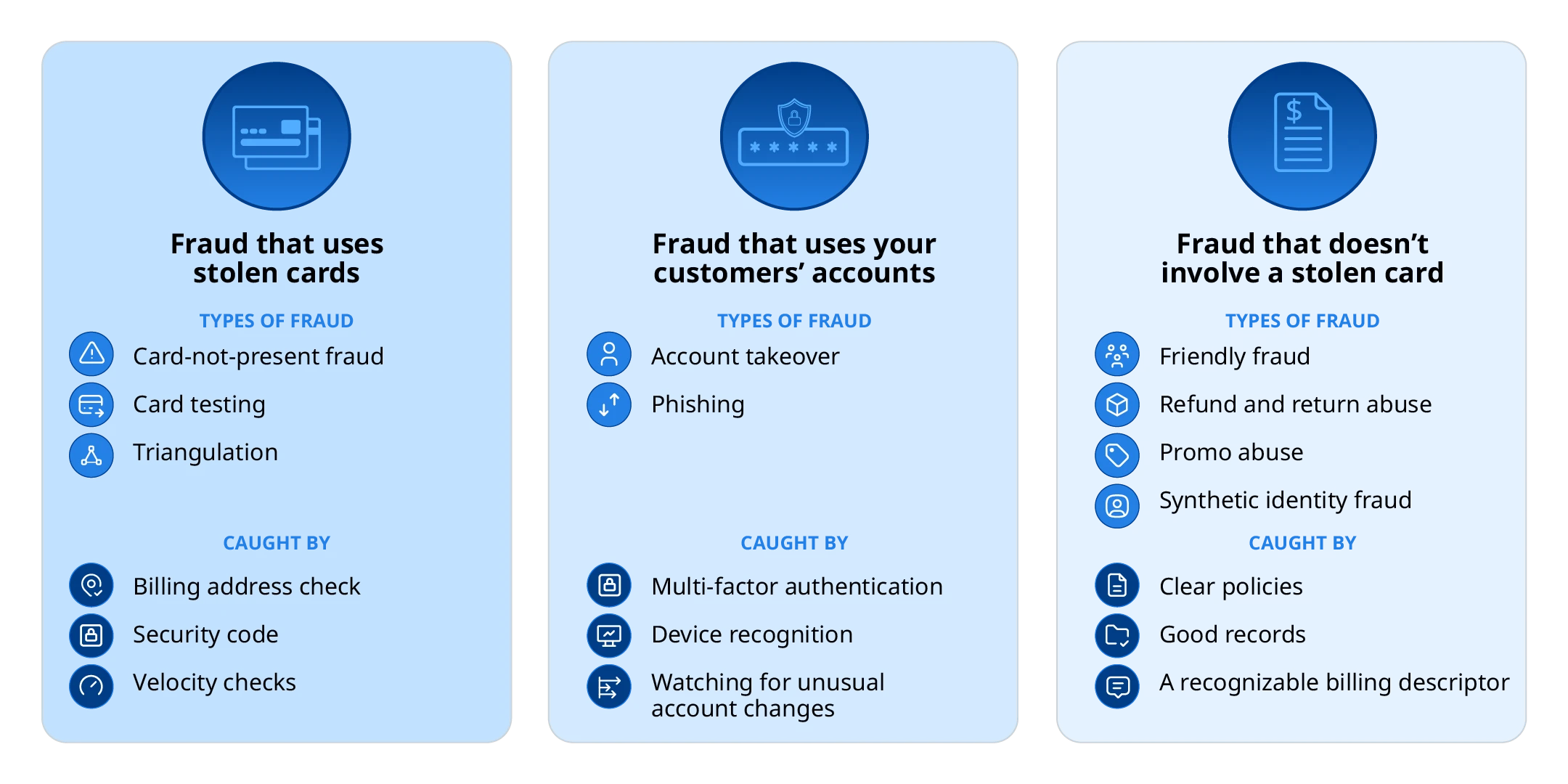
Common types of payment fraud that merchants see are card-not-present fraud, card testing, triangulation, account takeover, phishing, friendly fraud, refund and return abuse, promo abuse, and synthetic identity fraud.
Fraud that uses stolen cards
Payment controls can flag stolen card fraud by checking things like the billing address against the bank's records, the security code, and how many cards one device has tried.
Card-not-present (CNP) fraud: At a physical checkout, the EMV chip in the card—the global standard behind chip cards—helps prove the card itself is genuine. Online, the physical card isn’t there to verify, so stolen credentials are easier to use.
Card testing: Someone with a list of stolen card numbers may run transactions through your checkout to see which ones still work. Most of the list is dead, since banks cancel and reissue cards after a breach. But the fraudster tests them anyway by running a small charge on each card, one card after another, watching which ones go through.
This activity can cause thousands of declined attempts, drive up your decline rate and your authorization fees, and draw attention from Visa and Mastercard, who track how many of your transactions go wrong and can fine you for it.
Triangulation: A fraudster sells your product on a fake storefront, then fills the order by buying it from you with someone else's stolen card.
EXAMPLE: You sell shoes on your ecommerce site for $80.
The fraudster lists your shoes on a fake storefront at $50.
A shopper buys them there and pays him $50 with her own valid card. He keeps her money—and her card details.
He now has to deliver shoes he doesn't own, so he orders them from you at full price, paying with a card stolen from a fourth person, and enters the shopper's home address for delivery.
The shopper gets her shoes, at a discount, on time, so she never reports anything.
Weeks later, the fourth person (the cardholder whose card was stolen) sees a charge they didn't make and disputes it. Their bank reverses the payment and pulls the $80 back out of your account. You’re out of the shoes—and the money.
Fraud that uses your customers' accounts instead of their cards
Account takeover and phishing both go after your customer's account in your systems rather than their card. In one, the fraudster breaks in; in the other, the customer is tricked into handing over the password. With both of these, nothing about the card or the account looks wrong when the order comes through. That's what makes them hard to catch.
Account takeover (ATO): Once a fraudster is signed in as your customer, they can do everything a customer could: spend loyalty points, read personal details, change account information, and place orders. Your payment system only sees the orders. The rest happens in the account, and your payment controls may not look there.
Phishing: A fraudster sends fake messages—email, SMS, social media—designed to look like they came from you, with a link to a form or a website that isn’t yours. Your customer enters a password or card details, and the fraud shows up later, when those credentials are used for account takeover or CNP fraud.
Other fraud that doesn’t involve stolen cards
None of these involves stolen cards, so address and security code checks have nothing to catch. In the first two, the customer is real and the card is theirs. In the third, the accounts were created just to claim your discount or special offers. In the fourth, the person was invented.
Friendly fraud: A customer purchases something, then disputes the charge with their bank—for example, claiming they never ordered it or never received it. Sometimes it’s deliberate; sometimes they don’t recognize the transaction on their bank statement. It’s also called first-party misuse.
Refund and return abuse: A customer wears an item and returns it, claims a delivered order never arrived, or sends back an empty box.
Promo abuse: Someone sets up large numbers of accounts to claim sign-up discounts and one-per-customer offers repeatedly. To get around those limits, they may use disposable email addresses, virtual phone numbers, or email aliases.
Synthetic identity fraud: An attacker creates a fake person from a combination of real and invented details—often an actual Social Security number paired with a fictional name. It's a risk if people apply for something on your site, like store financing or a marketplace seller account. If they only buy, it rarely affects you.
If that financing or seller application asks for a photo or a video selfie to confirm identity, that's where deepfakes could turn up. Deepfakes are AI-generated images or videos that are convincing enough to pass for a real person, and there's no standard control for them yet. If identity verification matters to your business, it's worth looking at how you handle identity and enrollment before you rely on a selfie check.
What kind of ecommerce fraud does your business attract?
What you sell influences the fraud you’ll experience the most. If you sell digital gift cards, there may be no delivery address or delivery record to check, and little time to intervene. The gift card code can be emailed in seconds, and by the time the real cardholder disputes the charge, the gift card may have been redeemed or resold. If you sell furniture, you typically have several days between the order and the delivery, which gives you time to stop a suspicious order. Plus, you’ll have a delivery record if it ships anyway.
The table below shows the fraud you may see, and what to put in place, for six common business models.
BUSINESS MODEL | FRAUD YOU MAY SEE | WHAT TO PUT IN PLACE |
|---|---|---|
Digital goods | Card testing, CNP fraud | Limit repeated attempts from one card or device (helps curtail bot traffic) |
Physical goods | CNP fraud, refund and return abuse | Runs checks on the billing address and security code; keep delivery records |
Subscriptions | Account takeover, friendly fraud | Multi-factor authentication (MFA) for new devices or address changes; make sure your business name appears on their card statement |
Marketplaces | Triangulation, promo abuse | Vet sellers before they list; check whether banned sellers are returning on the same device |
Mobile ecommerce | Account takeover, card testing by bots | Watch how people interact with your app, and whether the device has visited before |
Recurring payments | Friendly fraud, unrecognized recurring charges | Make sure your business name appears on their card statement; keep clear subscription and cancellation records |
Mobile apps deserve a closer look. Fraud rules that work fine on your website can misjudge the same behavior in an app. A customer on their phone may autofill the whole form in a second, where the desktop customer might type it out. So a control that treats speed as suspicious might flag an ordinary customer as a bot.
What are the warning signs of ecommerce fraud?
No single warning sign proves fraud. Each one on its own could have an innocent explanation: the customer moved, is traveling for work, mistyped an address, or is sending a gift to another location. What matters is how many of these signals show up inside the same order.
Signals of mismatched data
The billing address on the order doesn't match what the bank has on file.
The security code is wrong.
The order is placed from an IP address in a different region than the billing address, though a customer using a VPN to mask their location can look that way, too.
Signals of repeated attempts to pay
A dozen or so payment attempts from the same card, account, or device in an hour.
Several declines in a row, then one that goes through.
A run of small charges in quick succession, often a dollar or two.
Signals in how an order ships
Overnight shipping on an expensive order.
A shipping address that hasn’t been used with the card or account before.
Delivery to a freight forwarder instead of a home or business address.
No single signal here should decline an order on its own. Send it for review instead, or ask the customer to confirm their identity—and save an outright decline for orders carrying several signals at once.
How to secure your payment gateway and card data
Payment gateway: This service carries card details from your checkout to your payment processor, which sends the transaction to the customer’s bank and brings back an authorization response—an approval or a decline.
A secure gateway encrypts card data in transit, so it can’t be read if intercepted. It can also tokenize the card number so your database never stores the real one. That matters most if you save cards for returning customers or bill on a subscription—the token stands in for the card so you can charge a repeat customer or run a renewal without storing the actual card number.
Cards change, though. They expire, get reissued after a breach, or get replaced when someone loses a wallet, and a token pointing at a dead card fails when you try to bill it. Processors offer an account updater that gets the new number from the bank when a card is replaced. Ask your processor if they offer this, since a failed renewal can look like a decline in your reporting when it’s really just stale card data.
PCI DSS: If you take card payments, PCI DSS applies to you. The Payment Card Industry Data Security Standard sets worldwide requirements for how card data is stored, transmitted, and protected.
In the current PCI DSS version, 4.0.1, 51 future-dated requirements became mandatory on March 31, 2025. Two of them specifically address ecommerce checkout pages:
Inventory and authorize every script running on the page.
Monitor the page for unauthorized changes at least every seven days.
Both are needed because of an attack called e-skimming—injected code that copies card details as customers type them, before the data ever reaches your payment systems.
Some of these controls are your provider's job, such as encryption in transit, and tokenization if you store cards—and some are yours.
You’re responsible for making sure:
Internal access to payment systems is reviewed and revoked when no longer needed.
The scripts running on your checkout page are inventoried, authorized, and monitored for changes (whether you handle that, or a provider does).
Your required PCI validation is completed against the current version: PCI DSS 4.0.1.
Payment verification controls: AVS, CVV/CVC and velocity checks
Not every control in this section is one you'll set up yourself. If you run a small store, your payment provider or fraud vendor already handles some of this on the back end, and the rest may be more than your team has time to manage. It's still worth knowing what each one does, because that tells you what to ask your provider and what you'll need as your business grows.
Address verification systems (AVS) and the card security code (CVV/CVC) are set up through your payment gateway. Velocity checks may live there too, or in a separate fraud tool. Each one looks at something different, and each one has a known weakness, which is why they need to run together instead of on their own.
What does the Address Verification System (AVS) check?
AVS compares the billing address your customer entered at checkout against the address their bank has on file, then returns a match code as part of the authorization response. It doesn't come back with just a match or no match—it can tell you that the ZIP code matched but the street didn’t, or the other way around.
Partial matches happen a lot, usually because someone typed "123 North Main" where the bank has "123 N Main." Check what your gateway does with a partial match. Declining everything that isn't a perfect match sounds like the safe choice, but it turns away customers whose address is correct and whose bank record is just formatted differently. Those customers might not call to complain—they might go to a competitor instead, and you’ll never know.
Not every bank supports AVS, especially outside the U.S. So a mismatch can point to a stolen card or a customer who moved and never told their bank.
What it misses: A hacker who stole the billing address along with the card number. AVS returns a match, and the order looks fine, which is why passing an AVS check can’t be trusted on its own.
What does the card security code (CVV/CVC) prove?
The card security code—CVV on Visa cards, CVC on Mastercard—is the three- or four-digit code printed on the card. It isn’t stored in the magnetic stripe or the chip, and PCI DSS rules don’t allow merchants to keep it after the payment goes through.
Because it isn't stored in the card’s data, it’s usually not in a breached database either—so asking for it during checkout can stop fraudsters who have stolen the card, but not the code that goes with it.
What it misses: A CVV or CVC that’s stolen along with the card number, or one your customer typed into a phishing page. Catching these means monitoring the account and the device, not just the card details.
How do you stop card testing with velocity checks?
Remember the fraudster running a small charge on each stolen card, one after another? That repetition is what velocity checks look for. They count how often the same thing repeats in a set period, and flag it when the count passes a set threshold:
Several different cards tried against one account.
One device or IP address making repeated attempts.
Multiple orders going to the same shipping address.
Several payments declined one after the other.
One transaction looks okay; 40 in an hour probably doesn’t. But your own traffic can spike, too—a sale, a promotion, or the day you bill subscribers. Thresholds may need loosening on those days, or legitimate customers may get declined.
What it misses: A single fraudulent order. Velocity checks only see repetition, so a one-off purchase gives them nothing to count.
How AI-powered fraud detection works
AI-powered fraud detection evaluates many signals across an order at once. It learns the patterns associated with legitimate and fraudulent transactions, then measures each new order against them. A mismatched address on an otherwise ordinary order scores as low risk. The same mismatch on an order that's suspicious in four other ways scores as high risk.
Fixed rules don’t work like that. A rule checks one thing and provides one answer. For example, if the shipping address doesn’t match, the order is blocked, whether it’s an attacker or a customer sending a gift.
Most merchants don’t build AI-powered fraud detection in-house—they buy it from their payment provider or a fraud prevention vendor. In practice, most working systems run both: standard controls for known types of fraud or any regulations that need to be enforced, and AI models for things the standard rules don’t cover.
Device fingerprinting, behavioral analytics, and risk scoring are what an AI system uses to tell a fraudulent order from a legitimate one. The first two produce signals; risk scoring is where the model weighs them and decides.
What does device fingerprinting recognize?
Device fingerprinting has nothing to do with actual fingerprints. It recognizes the device, network, and browser your customer uses—the kind of details that stay consistent across sessions. A fraudster can enter a different card, email, and shipping address on every order, because those are just fields typed in at checkout. Device signals are harder to change consistently.
For example, one phone places orders on nine different accounts in a week. Each order looks fine on its own—different names, different cards, different addresses—but they're all coming from the same device, and device fingerprinting is what connects them.
It works the other way, too. A customer who's shopped with you for three years suddenly appears on a device you've never seen. That might be a new phone, or it might be someone who got into their account.
What does behavioral analytics track?
Behavioral analytics tracks how someone moves through your site, such as their typing speed, mouse movement, and the path they take to checkout, then measures how far each session sits from normal patterns. If something looks off, you can hold the order for review before the payment goes through.
Bots and scripted attacks sit far outside normal patterns, which is why they get caught. But so do plenty of real customers—someone using a screen reader, or someone working through checkout slowly on a borrowed phone. Like the rest of the controls, this is why behavioral analytics shouldn't make fraud decisions on its own.
What signals should risk scoring include?
Risk scoring uses AI to pull together the address check, the security code, velocity, device recognition, and behavioral signals in real time, then turns them into a single score. That number decides what happens next: approve, send for review, or decline.
The review option matters most for revenue, since most orders aren't fraud and the uncertain ones are mostly legitimate. Rather than declining them automatically, a human review or a quick identity check can let most of them through.
Whether the score sends an order to review or to a decline comes down to how the model weighs each signal, and that's something it learns over time.
How to protect customers from account takeover (ATO)
Account takeover (ATO) is one of the hardest frauds to detect because so little about the order looks wrong. The account belongs to a real customer, the card used is one the customer saved, and they’ve ordered from you many times before. Everything the attacker does after signing in—changing a phone number, adding an address, or saving a new card—is something the real customer does, too. And most of these changes never reach your payment systems, so they go undetected.
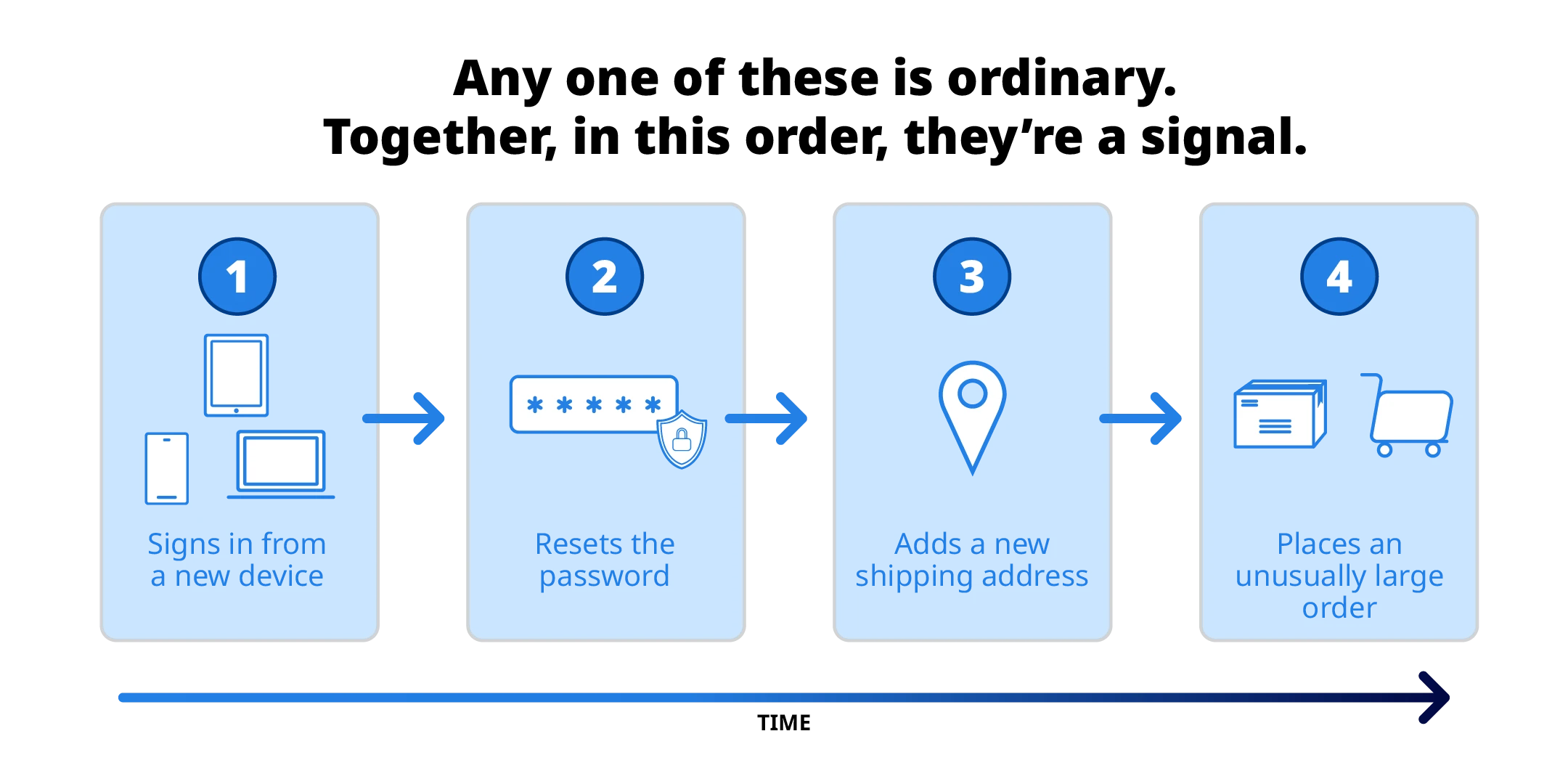
Since your payment controls won't see any of this, the place to catch account takeover is at login. You should:
Require multi-factor authentication (MFA) for high-risk actions like changing a password, adding a shipping address, or saving a new payment method.
Add credential-stuffing protection. Attackers buy passwords stolen from other companies and try them on your login, betting that people reuse the same one everywhere. Ask your identity verification provider about bot detection and breached-password screening.
Check your password reset process—the “forgot password” link customers use. A reset doesn't always take customers through your login, so MFA can be skipped. If someone can reset a password without proving who they are, they don't need to worry about your login—they go around it entirely.
Don’t rely on CAPTCHA. It stops simple scripts, but a fraudster running an attack can pay a service pennies per puzzle to solve them at scale. Treat it as one layer of prevention, not the whole solution.
Watch the sequence, not a single event. A sign-in from an unfamiliar device, then a password change, then a new shipping address. Each one is something customers do, but in that order they're worth an alert.
Watch your totals, too. A sudden jump in password resets across all accounts usually means someone is working through a stolen credential list.
Every one of these puts another step between your customer and a completed order, so be deliberate about where you add them. A second factor at every login wears people down, and some will abandon the account rather than keep proving who they are. Asking at the points where someone can change a password, add an address, or save a card puts the step where the damage would happen. What you're after is protection at the points an attacker has to pass through, not the maximum protections you could install.
How to stop chargebacks before they happen
A chargeback is a refund you didn’t agree to. It happens when a customer disputes a charge with their bank, the bank takes the money from your account, and you don’t find out about it until after it’s gone. You can contest the chargeback with the bank, but it’s faster and cheaper to stop it from happening in the first place.
To stop chargebacks, fix the things that send customers to their bank instead of you:
Make your billing descriptor recognizable: When a customer looks at their card statement, they should be able to tell the charge came from you. The descriptor often defaults to your legal business name instead of your store name, so ask your processor to change it—and add a support number if there's room.
Write your return and cancellation policies plainly, and make them easy to find: If a customer can’t figure out how to cancel their subscription or return a purchase, some may go to their bank to stop the charge instead. Put the policy somewhere obvious, like the order confirmation, the account page, or the footer.
Answer quickly: Customers expect quick answers. An automatic reply that confirms you got the message and says when they'll hear from you is a good customer experience—as long as you hit the response window you promised.
Keep good records from the moment of the order: What the customer bought, what they paid, when it shipped, and what they agreed to at checkout, plus the IP address, device ID, delivery confirmation, authentication results, and any communications with the customer. Most of this is hard to reconstruct weeks later, and it's what you'll need if you decide to contest a dispute. A payments operation platform that stores the information about the payment and allows you to dispute chargebacks makes this easier.
BY THE NUMBERS: Visa processed 106 million disputes worldwide in 2025, up 35% since 2019. Mastercard puts the average cost of a chargeback at $128 for the merchant in third-party fees and internal costs, and they forecast that the worldwide value of chargebacks will reach $46.1 billion in 2029.
Use chargeback alerts if your processor offers them
Not every complaint to a bank becomes a chargeback. When a customer disputes a charge, their bank can send an alert through your processor before the dispute formalizes, which gives you a window to refund or resolve it directly. Resolving it can keep the dispute from becoming a chargeback, though a fraud report already filed on the transaction may still count toward your ratio under the Visa Acquirer Monitoring Program (VAMP).
You come out ahead when the alert stops a real chargeback. You lose when you refund someone who wasn't going to pursue it.
How to monitor fraud across every payment channel
Most merchants watch each payment method separately: cards in one system, Automated Clearing House (ACH) bank transfers in another, and wallets somewhere else.
The challenge: A fraudster tries a card, gets blocked, then tries ACH, then a digital wallet. When you monitor them separately, you see three unrelated failed attempts instead of one person trying all your payment methods.
The solution: Put cards, ACH, wallets, mobile transactions, recurring billing, refunds, and account activity in one connected view, then:
Reconcile daily.
Set alerts that trigger when a number moves outside its usual range.
Break out trend analysis by channel, payment method, customer segment, and device, because a problem in one channel can disappear when it's averaged into your total.
ACH needs particular attention this year. Nacha, the organization that sets ACH rules, put new fraud monitoring requirements into effect in 2026. We’ve covered what the new rules require.
How to create a fraud response plan
A fraud response plan is what your team follows when fraud happens, so you don’t have to improvise in the moment. Start by writing down the steps, naming an owner for each, and making sure everyone knows what they’re expected to do.
1. Freeze the affected account or transaction
Owner: Fraud or risk operations
Action: Lock the account and hold any unshipped orders, then investigate.
2. Notify your internal teams
Owner: Whoever caught the fraud
Action: Tell fraud, support, and security. Start with support, since they'll be answering calls from customers before anyone else knows what happened—have a script ready for them.
3. Preserve the evidence
Owner: Fraud operations
Action: Save everything right away—transaction records, device data, IP logs, authentication results, and any messages with the affected customer. Some of it ages out of your system and can't be recovered.
4. Contact the affected customer
Owner: Support
Action: If someone got into the customer's account, tell them. They'll need to change that password anywhere else they've used it.
5. Alert your processor or bank
Owner: Finance or payments
Action: Tell them right away. Reversal windows are short, especially on ACH, and your processor may be seeing the same pattern with other merchants.
6. Document what happened
Owner: Fraud operations
Action: Record what the fraud was, how it was caught or missed, and what needs to change so it doesn't happen again—a velocity threshold, a rule, or a note back to your fraud vendor if the model was the one that missed it. This step often gets skipped, but it's the one that keeps the same fraud from working twice.
Fraud prevention metrics to track
Your fraud rate is the percentage of transactions that turn out to be fraudulent. It's easy to improve: decline more orders and it drops. But your revenue drops with it.
A low fraud rate can mean two different things. One merchant might have a low rate because their controls are working, catching bad orders and letting the good ones through. Another one might have a low rate because it declines anything that looks slightly off, but it also stops legitimate sales along with the fraud.
Both have the same fraud rate, but one of them is losing money. That's why relying on one number isn't enough.
METRIC | WHY IT MATTERS | HOW OFTEN TO CHECK |
|---|---|---|
Fraud rate | What fraud is costing you | Weekly |
Chargeback rate | How many customers are disputing charges | Weekly |
Approval rate | How many orders you’re completing | Weekly |
False-decline rate* | Legitimate revenue you turned away | Monthly |
Manual-review rate | How much staff time manual reviews take | Monthly |
Recovery rate | How much of a disputed amount you win back | Monthly |
Conversion by customer group | Whether one group of customers is dropping off more than others | Quarterly |
*False declines are the hardest to measure, since nobody tells you when you've turned away a legitimate customer.
Set your own alerts below the card networks' monitoring thresholds, so you find out your numbers are climbing before Visa or Mastercard does. Ask your processor what the current thresholds are and where your chargeback rates sit against them, then set your alert short of the limit. Review these by channel and customer group as well as in total, since one bad segment can disappear inside a healthy-looking average.
How to choose the right ecommerce fraud prevention solution
You’ll need to know how well your provider’s system fits your business—what it takes to install, whether it automatically updates as new types of fraud emerge, and what it costs you in staff time once it's running.
What to look for in a fraud prevention solution:
It learns from new fraud instead of waiting for someone to write a rule for it.
It connects to your gateway and ecommerce store platform without months of development work.
It holds up on your busiest day, when you can least afford a problem.
It can tell you why an order was declined, in plain enough terms that your support team can easily explain it to the customer.
It works with your PCI DSS obligations instead of complicating them.
It still works if you change processors, or add one.
It can review flagged orders for you if you don't have the staff to do it yourselves (vendors call this managed review).
It provides clear cost projections, including the hours your team will spend reviewing flagged orders.
One thing the checklist above doesn’t cover: fraud tools collect device and behavioral data on every customer, including the ones who haven't done anything wrong. If the General Data Protection Regulation (GDPR), the California Consumer Privacy Act (CCPA), or another privacy law applies to you, that data is your responsibility as much as the vendor's. Ask the vendor for a SOC 2 report—an independent audit of how a vendor handles the data you hand over. Any serious vendor will have one ready.
Questions to ask a vendor:
How do you know when you've declined a good customer?
What's your false-decline rate?
How much manual review will this create for my team?
What happens to my chargeback rate, and can you show me that from another customer?
What customer data do you collect, where is it stored, and how long do you keep it?
What happens to that data when we leave?
Can you send us your SOC 2 report?
How CSG Forte helps prevent ecommerce fraud
CSG Forte's payment solutions for ecommerce provide several layers of fraud protection: monitoring across cards, ACH, and wallets into a single view; routing uncertain orders to review instead of declining them; keeping stored cards working when they're reissued; and doing all of it without requiring you to change processors.
One view across cards, ACH, and wallets: PaymentsProtection.ai—CSG Forte’s AI- and machine-learning-powered fraud monitoring platform—analyzes ACH, card, and digital wallet activity across online, phone, and in-person channels in a single view. Merchants who need documented ACH monitoring under Nacha's 2026 rules get it in the same system that watches their card traffic.
Somewhere to send the orders you’re unsure about: The platform approves, declines, or reviews transactions using the rules and thresholds you set. You can escalate cases to your own risk team or, if you’d prefer, route them to CSG Forte analysts according to agreed service levels.
Stored cards that keep working: Tokenization protects the card data you store, and an account updater refreshes stored card credentials when a card is reissued, so a failed payment doesn't get counted as fraud. On the ACH side, Direct Recovery automatically re-presents payments that fail for insufficient funds.
No processor migration: PaymentsProtection.ai is processor-agnostic. It takes in and analyzes payment data whether or not you process on CSG Forte, so it can sit on top of the payment setup you already have.
CSG Forte targets a 50–70% reduction in fraud-related losses and a 1:3 ratio of confirmed fraud to false-positive alerts. The second number means three legitimate orders get flagged for review for every fraud caught. There's no version of this where the system flags only fraud. Catching the ambiguous cases means looking at some good orders too, and 1:3 is the balance CSG Forte is aiming for.
See how CSG Forte's payment risk management works, or talk to us about what your current setup isn’t catching.
Frequently asked questions
Why use layered fraud prevention instead of a single tool?
Every control has a gap. The address check misses a fraudster who stole the billing address along with the card number. The security code misses one who phished it from your customer. Velocity checks miss a single order because nothing repeats. Layering them means one control's blind spot is covered by another's.
How can small businesses prevent ecommerce fraud?
Start with what's already sitting in your payment gateway: address and security code checks, and velocity limits. Turn on MFA for customer logins and for your own admin accounts, and use tokenization so you aren't storing card numbers yourself. From there, a managed or processor-supported service usually fits better than hiring someone, since it gives you monitoring and review staff without a fraud team of your own. Choose controls that protect revenue without adding steps at checkout because a small store can’t afford abandoned checkouts.
How should you monitor for refund and return abuse after a purchase?
Watch patterns across a customer's history rather than individual returns. One "item not received" claim is ordinary; four from the same account in six months isn't. The same goes for returns that consistently arrive damaged, or accounts that return most of what they buy. Refund abuse doesn't show up in your payment data, so it needs to be tracked at the account level—and your return policy has to be specific enough to enforce once you find it.
What is risk-based friction?
Risk-based friction is adding a verification step only where the risk warrants it, instead of for every customer. A first-time buyer placing a large order from an unfamiliar device might be asked to confirm their identity; a returning customer on a device you recognize isn't.
How often should you review your fraud rules?
Monitor continuously and review formally at least monthly, plus after any sale, product launch, or fraud spike. A threshold that works in a normal week is wrong on a promotion day, so adjust before a sale and set it back after. Look at your false declines and approval rate alongside your fraud losses. Tightening a rule will bring your fraud number down and your declines up, and you'll only see half of that if fraud is the only thing you're watching.
What should you do first if you find fraudulent orders?
Lock the affected account and hold any unshipped orders before you investigate. Then preserve the evidence: transaction records, device data, IP logs, and any messages with the customer, since some of it ages out of your systems. Notify your internal teams, alert your processor or bank, and contact the customer if their account was compromised.